
So the final chapter of the Line tutorials, let's look at how to connect our 2D line layer to 3D points, that are either parented or not.
Before, we worked with 2D layers and we managed to keep the line connected when it was parented, but when the Nulls were made 3D and the camera was turned, it looked like this:
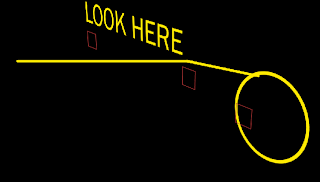
Which is just terrible! So how do we keep the connection?
toComp
Okay, time to learn a new expression: toComp.
toComp is a bit hard to explain.
Think of it this way, the position of our points in X and Y haven't changed. Only our camera has changed. (remember that we only saw this problem when we moved the camera. When the camera stayed in its default position, we didn't see it). Basically, the camera is converting the 3D space (World) into a 2D image (Comp).
When we moved the camera, the X Y and Z positions of the Nulls don't change in 3D or world space, they're still at whatever value they are. However, RELATIVE to the camera, they APPEAR to change position (in the Comp). This is the problem. Since the ACTUAL World positions of the objects aren't changing, then the expressions have no change to calculate. In that case we need to tell the expression to consider the position of the camera, and in doing that, we have to convert the 3D positions of the Nulls to positions relative to what the camera is seeing. I hope that makes sense.
DON'T PANIC! The toComp expression is so easy to use, you'll probably wish you hadn't read the above paragraph. There's no complex math to it.
So to get it working, let's go to the first expression in our comp, which is the "Starting Point" of the first beam, linked to the "START" Null.
Select it and clear the expression. Then, apply the following expression:
thisComp.layer("START").toComp([0,0,0]);
Yes, it's that easy!
So what's going on here?
This expression tells AE to convert the layer "START"'s position to Composition space, rather than World space. Comp space obviously in this case means relative to the camera in 2D (since the Camera produces a 2D image). The [0,0,0] means that it needs to convert the Null's 3D position relative to the Comp origin! You can adjust this value to apply an offset, though I've never had to do this.
This expression also serves its advantages:
1. We no longer have to worry about whether our object is parented or not. This is because the POSITION of the Null relative to the Comp is what's used. It doesn't matter where in the world it is, only where in the COMP it is. So no complicated math like last time.
2. It's awesome. If you fly around now, you can see that it connects perfectly. you can even go behind and all.
So, this means that we've managed to make a 2D effect look 3D, by simply using the toComp function.
You may also notice that you can make the layers 2D again and parent, and it will still stick!
And that's all there is to it :-D
I hope you enjoyed this trilogy. Feel free to check out the new After Effects series: Workflow tips.

See you in the next one! Like? Hate? Opinion? Comment below will be appreciated!